5 Tips to Optimize GraphQL Performance on Magento / Adobe Commerce
Sluggish GraphQL queries draining your Adobe Commerce performance? Discover five actionable techniques to dramatically accelerate your headless commerce implementation.

GraphQL usage is becoming increasingly common on Adobe Commerce, whether to connect third-party services to the application or simply to create a headless webshop. Moreover, being easily extensible, it is straightforward for developers to add data to the existing schema or extend it with new queries.
However, performance is far from optimal in the default version (application bootstrap on each request, *resolvers* multiplying database queries, etc…). Essential data is also sometimes missing to allow the frontend to obtain all useful data, such as the media gallery on the products request.
Swoole to boost performance for the enterprise version.
To address this performance issue, the GraphQL Application Server module was created in early 2024 for the enterprise version of Magento, which allows maintaining application state between requests using Swoole, with one (or multiple) worker thread(s). This provides an improved response time for GraphQL requests of 30% according to the documentation!
Traffic to /graphql path is routed to the Swoole worker:
location /graphql {
    proxy_set_header Host $http_host;
    proxy_set_header X-Forwarded-For $proxy_add_x_forwarded_for;

    proxy_pass http://127.0.0.1:9501/graphql;
}
An independent and asynchronously indexed schema as an alternative for Adobe Commerce:
To address the performance issue and also have more useful data available for headless frontend creation, Adobe Commerce also provides Storefront Services GraphQL. Here Adobe provides a new GraphQL schema on a dedicated URL, with only a few GraphQL queries, using data from an index, therefore without application bootstrap or database queries. GraphQL mutations and some other GraphQL queries are not available, you must continue to go through the GraphQL schema available directly on Magento. Magento sends catalog data asynchronously with SaaS modules to add. An admin dashboard (Data Management Dashboard) allows you to control your catalog synchronization live.
To both use Magento Core GraphQL and Catalog Services GraphQL, you can use API Mesh.
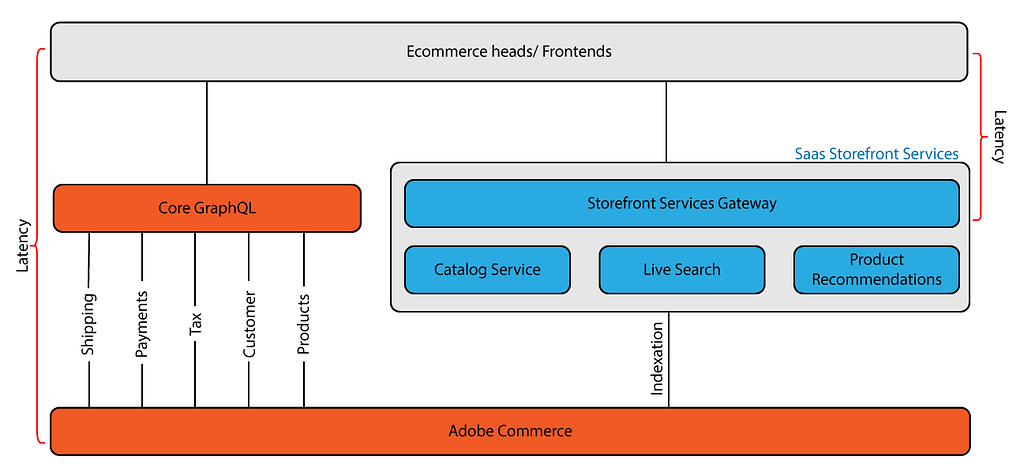
In summary, what is different with GraphQL Storefront Services:
- More exploitable elements directly for the frontend (example, the media gallery exists directly on the products query)
- No mutations, just queries (read-only)
- Optimized for performance through the use of data coming directly from an index
- Magento upgrades do not impact the GraphQL Storefront API
- The differences between product types are simplified and easier to exploit on the frontend
- Require the customer group/store context in the HTTP headers
But what can we do If we don’t have the enterprise or Adobe Commerce version?
- *Use only necessary fields in your GraphQL queries*
This may seem obvious, but the simplest thing to implement is already to verify that the requests set up on the frontend application side contain only the necessary fields. This avoids loading GraphQL resolvers for nothing, and therefore multiplying database queries, which combined will have a significant negative impact on the response time of the GraphQL request…
For example, if I want to display products in a listing, do I really need to retrieve the product options at that location?
query myProductList {
    products(
        filter: {
            category_id: {eq: 1}
        },
        pageSize: 500
    ) {
        items {
            ... on CustomizableProductInterface {
                options {
                    title
                    required
                    sort_order
                    option_id
                    ... on CustomizableDropDownOption {
                        value {
                            option_type_id
                            price
                            sku
                            sort_order
                            title
                        }
                    }
                }
            }
            id
            attribute_set_id
            sku
            name
            url_key
            stock_status
            special_price
            canonical_url
            short_description {
                html
            }
        }
    }
}
2. *Optimize native resolvers*
It can be interesting to reduce the number of database queries on the products resolver for example, by taking advantage of what is already in the documents of the catalog_product index. This requires some overrides at the dataProvider level of the products resolver to preserve all the data from the document, not just its position.
Example of a plugin on MagentoCatalogGraphQlModelResolverProductsDataProviderProductSearch
https://medium.com/media/60fe03c370f9544a5208e9fdd388839f/href
Here only the attributes not present in the document are queried in the database during the call to collectionPreProcessor and collectionPostProcessor. The attributes present in the document have been added to the collection items via the custom setItemDataFromDoc method.
Once this is done, you can add the maximum of attributes required by the frontend to the catalog_product index. You can even add the media gallery via a new dataSource to the catalog_product index for example, to complete the products query without requiring new database queries.
https://medium.com/media/9d56c4b956c9e0acc3ea3e541eca0c48/hrefhttps://medium.com/media/2b2bba84cdca10ac84f6f1710d61ef69/href
3. *Remove any resolver process that can be done asynchronously*
For example, if you have a WebP image generation module, make sure that no generation can be done on the fly via the *GraphQL area*, and favor an asynchronous task to perform this processing.
Check if you have this kind of method, otherwise implement it yourself:
/**
 * Check if webp convert on the fly enabled
 *
 * @return bool
 */
public function isWebpOnTheFlyConvertEnabled(): bool
{
    return 'graphql' !== $this->state->getAreaCode();
}
4. *Profile your application with Blackfire to find critical points*
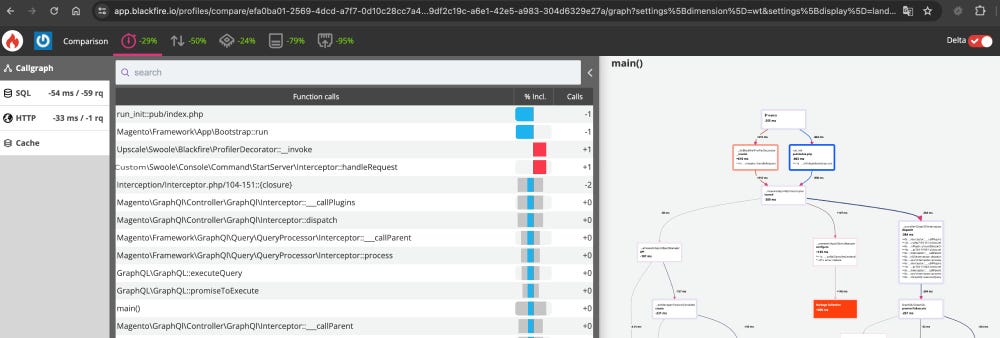
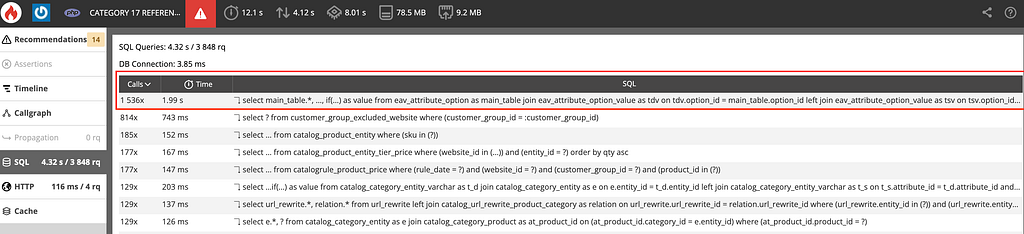
*Blackfire*, or other tools like *Xdebug* with *flamegraph* output, will allow you to better identify what is slowing down your GraphQL query and direct your efforts.
5. *Switch to FrankenPHP*
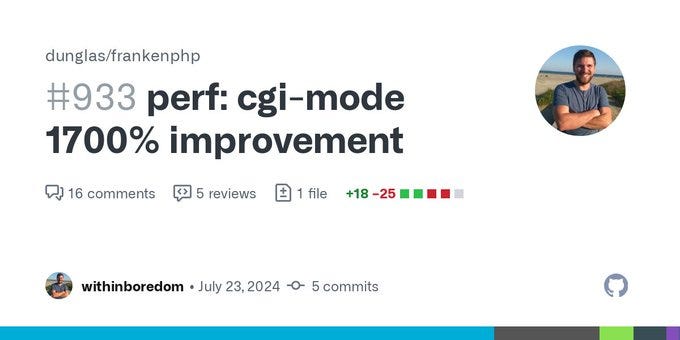
Since version 1.2.3 of *FrankenPHP*, its normal mode (non-worker mode) provides performance equivalent to using Swoole…
If you wish to switch your Magento to FrankenPHP, *ekino* provides a *FrankenPHP Magento 2 skeleton* that can simplify the initialization of this project.
A quick benchmark with *k6* gave me these results during a test for a project (10 Virtual Users over 30 seconds):
| query graphql   | php-fpm          | php-fpm + Swoole  | FrankenPHP        |
| --------------- | ---------------- | ----------------- | ----------------- |
| createEmptyCart | http_reqs : 5024 | http_reqs : 7091  | http_reqs : 7147  |
| getProducts     | http_reqs : 3715 | http_reqs : 2597  | http_reqs : 5765  |
| cmsPage         | http_reqs : 6253 | http_reqs : 10250 | http_reqs : 11880 |
You can clearly see the benefit of FrankenPHP compared to a classic nginx/php-fpm stack. On 3 typical requests, we have a gain of over 40%.
Here is a set of ideas that can be implemented to optimize the performance of GraphQL requests on Adobe Commerce / Magento.
We have used some of them at ekino, but there are other strategies, feel free to comment on this article and detail how you have improved GraphQL performance on Magento on your side.
5 Tips to Optimize GraphQL Performance on Magento / Adobe Commerce was originally published in ekino-france on Medium, where people are continuing the conversation by highlighting and responding to this story.
Articles



Un projet ?
Parlez-nous de vous, de vos projets, de vos ambitions, de vos enjeux, et construisons ensemble des solutions concrètes qui contribuent à votre transformation.