
As you know, SQL is not so easy.
Structured Query Language is, by definition, a language. It has its own syntax, its own convention and like any other languages, it needs some linting stage to ensure the code quality.
Without the usage of an ORM, writing large queries can be a mess. You know.

My daily routine
Every day, when I use a programming language, I try to enhance code quality by using a linter tool.
What is a linter ?
My definition of linting is simple. It’s the way to detect and track syntaxes errors and malformed code. But we can go further with this type of tool, for example, auto-fixing the code, refactoring the code and so on.
Why does it enhance code quality? For me, linters bring the code cohesion on each part of the application. It helps developers to uniformise the code aspect to increase readability and decrease the cognitive load. That’s an important point for the Developer Experience, which is part of the points that we work on our projects at ekino.
As a PHP developer, most of the time, SQL is managed by an ORM (Doctrine, Eloquent, …) and SQL writing from scratch is not part of our daily routine anymore. But sometimes we need to write SQL from scratch into dedicated *.sql files. In my recent missions, I was asked to write large SQL queries in order to generate Materialized Views, as well as inlining data into them. To do this, I used advanced aggregation functions provided by PostgreSQL.
Linting SQL files is a natural step to ensure quality across all layers of an application. After all, we lint PHP, JavaScript, Java, Python, Go code, etc… So why not SQL?
Now let’s dive in SQLFluff, and how it is a good choice as a linter.
How to used SQLFluff on local and CI
The official documentation states that “pip” must be used for installation. There is an official Docker image and is really easy to use.
The first step is to pull the image and use it to trigger the lint on the dedicated file:
# Get the official image from the docker registry
$ docker pull sqlfluff/sqlfluff:3.3.1

# Run the SQLFluff binary on the sql file
$ docker run -it - rm -v $PWD:/sql sqlfluff/sqlfluff:3.3.1 lint test.sql
For personal preference, I will create a configuration file at project’s root, named .sqlfluff
[sqlfluff]
dialect = postgres
After having specified the SQL dialect, we can safely execute this command:
$ docker run -it - rm -v "$(PWD):/sql" sqlfluff/sqlfluff:3.3.1 lint src/requests
I liked this tool even more when I discovered it avoids unnecessary joins, those that are included in queries but never actually used. It’s even more useful than I initially thought, similar to PHP-CS-Fixer for PHP, ESLint for JavaScript, or golangci-lint for Go. It knows how to generate an error when necessary. For example, in the case of a query containing incorrect joins or the selection of a column outside of a GROUP BY clause.
Even though I enjoy using SQLFluff, I encounter an issue with a specific case where I had to use SQL with PHP PDO params : (colon)
-- PDO query example
SELECT buyers.first_name
FROM buyers
WHERE buyers.type = :type;
In this example you can see parameters interpreted by PHP (PDO) prefixed with a colon (:type), but in standard SQL this query doesn’t exist. Parameters existing in SQL like this next example.
-- SQL query example
PREPARE stmt FROM 'SELECT buyers.first_name FROM buyers WHERE buyers.type = ?';

EXECUTE statement_name USING 'VIP'
DEALLOCATE PREPARE statement_name
In our case, we decided to remove a check of space around the colon with this rule.
[sqlfluff:layout:type:colon]
spacing_before = any
spacing_after = any
Every language or ORM uses a specific method to parse and secure the query, it was a good idea to adapt them. We preferred to lose this check about the space around the colon but keep the more value that our language offers with the management of parameters that guarantee security and improve the development experience.
NB: At the time of writing this article, I am no longer on the project, but I found a simpler and better solution, you just need to add these keys to the configuration.
[sqlfluff]
templater = placeholder

[sqlfluff:templater:placeholder]
param_style = colon
Apart from this minor inconvenience, we did not encounter any other problems. Just like every linter we set up, we had to correct a lot of detected errors that could not be fixed automatically with the command.
$ docker run -it - rm -v "$(PWD):/sql" sqlfluff/sqlfluff:3.3.1 fix path/of/RawSql
A practical example
-- Query example
SELECT
    animal.weight,animal.description,
    animal.age
FROM animal
LEFT JOIN zoo ON animal.id = zoo.animal_id
WHERE animal.name = :animalName

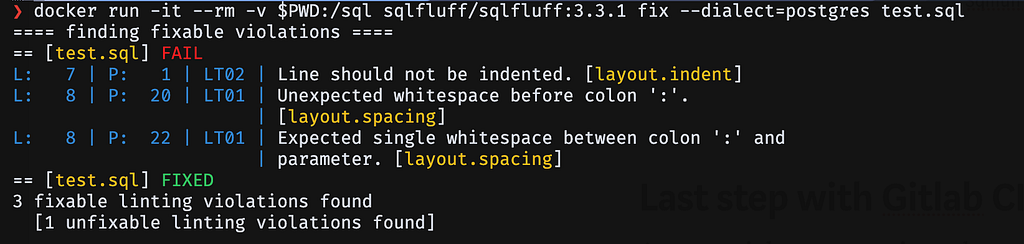
Output after fixing with default configuration
SELECT
    animal.weight,
    animal.description,
    animal.age
FROM animal
--not removed automatically by SQLFluff but always present in lint output
LEFT JOIN zoo ON animal.id = zoo.animal_id
WHERE animal.name =: animalName
Last step with Gitlab CI
As you might expect, given the previous steps, a setup for a CI is very easy.
We use the same Docker image in local and in the Gitlab CI, in which we added a testing stage.
sqlfluff:
  image:
    name: sqlfluff/sqlfluff:3.3.1
    entrypoint: [ "" ]
  stage: tests
  script:
    - sqlfluff lint app/any/path/src/MaterializedViews/RawSql
  variables:
    SQLFLUFF_WORKING_DIR: "app"
Conclusion
SQLFluff offers a simple and efficient experience for linting SQL files. Just like any other linter in a project, it should be included whenever your codebase contains raw SQL. Its ease of use and out of the box features makes it an essential tool for maintaining code quality and consistency.
I took some time before publishing this article, and since then SQLFluff has reached version 3.5.0, with version 4.0 already in the works. I highly encourage anyone interested to check out the release notes, they are very detailed and full of interesting improvements.
Do you want to lint your SQL code? Try SQLFluff was originally published in ekino-france on Medium, where people are continuing the conversation by highlighting and responding to this story.