TanStack Router vs React Router v7
React Router has evolved dramatically with version 7, introducing many features that were previously exclusive to TanStack Router. But does this mean the gap has closed? This comprehensive comparison examines both routing libraries in their current state, helping you understand which solution best fits your project’s needs.
Versions compared
This comparison focuses on:
· React Router v7.8.0 (latest stable version as of August 2025)
· TanStack Router v1.131.2 (latest stable version as of August 2025)
Both versions represent mature, production ready solutions with distinct philosophies and capabilities.
Understanding React Router v7’s dual nature
One of the most important things to understand about React Router v7 is that it operates in two distinct modes, each with different capabilities:
Framework mode:
In framework mode, React Router v7 acts as a full-stack framework:
· File-based routing with automatic route generation
· Server-side rendering (SSR) and streaming capabilities
· Enhanced type safety with auto-generated types
· Built-in build tooling and bundling
· Server functions and API routes
// Framework mode setup - routes/product.tsx
import type { Route } from "./+types/product"; // Auto-generated types

export async function loader({ params }: Route.LoaderArgs) {
  // params.id is fully typed as string
  return { product: await fetchProduct(params.id) };
}

export default function Product({ loaderData }: Route.ComponentProps) {
  return <h1>{loaderData.product.name}</h1>;
Library mode (SPA):
In library mode, React Router v7 works as a traditional client-side routing library:
· Manual route configuration in React components
· Client-side only (Single Page Application)
· Limited type safety (similar to React Router v6)
· You provide your own build tools
· No server-side features
// Library mode setup
import { BrowserRouter, Routes, Route, useParams } from 'react-router-dom';

function Product() {
  const { id } = useParams(); // string | undefined, not guaranteed
  // Manual data fetching and state management
  return <h1>Product {id}</h1>;
}

function App() {
  return (
    <BrowserRouter>
      <Routes>
        <Route path="/products/:id" element={<Product />} />
      </Routes>
    </BrowserRouter>
  );
}
Why this matters?
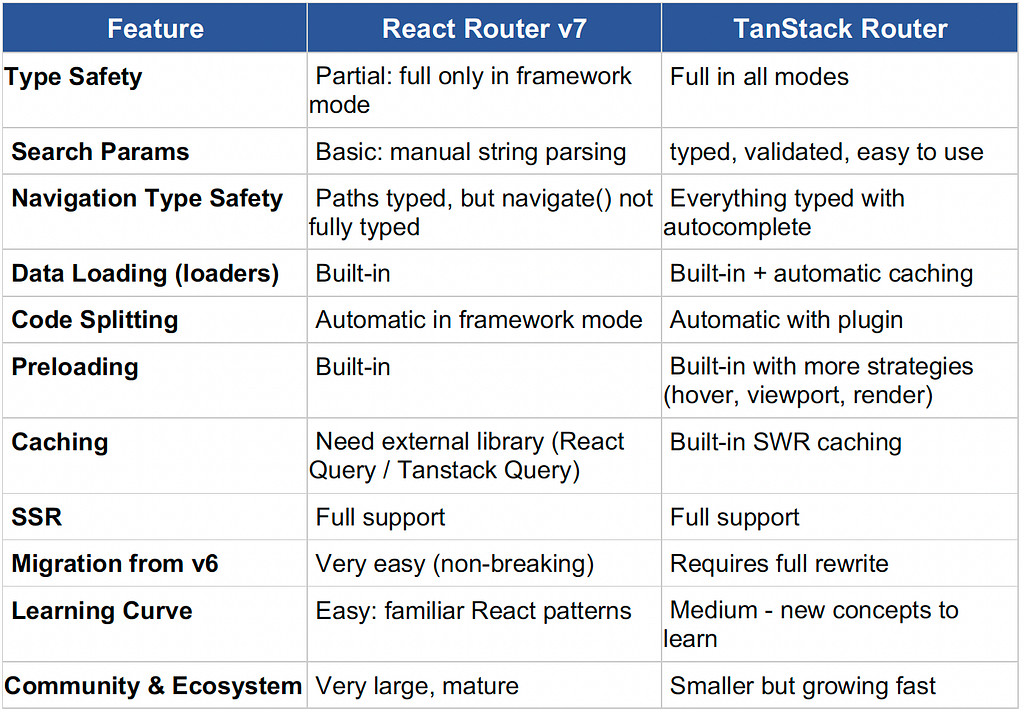
Most of React Router v7’s advanced features and type safety only work in framework mode. This means if you’re using it as a traditional SPA library (which most existing projects would), you don’t get the enhanced type safety or modern features that compete with TanStack Router.
The current landscape
With this understanding, React Router v7’s position becomes clearer. In framework mode, it offers compelling features that compete with TanStack Router. In library mode, it remains more similar to traditional React Router with incremental improvements.
TanStack Router continues to lead in comprehensive type safety, advanced search parameter management, developer experience optimization across all use cases whether you’re building a SPA, SSR application, or anything in between. Let’s explore where each library stands today.
Type safety: the critical difference
React Router v7’s Type Safety Progress:
React Router v7 has made substantial improvements in type safety:
// React Router v7: Framework Mode
import type { Route } from "./+types/product";

export async function loader({ params }: Route.LoaderArgs) {
  // params.productId is typed as string
  const product = await fetchProduct(params.productId);
  return { product };
}

export default function Product({ loaderData }: Route.ComponentProps) {
  // loaderData contains whatever the loader function returns
  // So loaderData.product is properly typed
  return <h1>{loaderData.product.name}</h1>;
}
However, if you use it as a library (without the framework), you don’t get these type safety features. Parameters remain `string | undefined`, and the compiler won’t catch navigation errors:
// React Router v7: Library Mode (SPA)
import { useParams, useNavigate } from 'react-router-dom';

function ProductPage() {
  const { productId } = useParams(); // Still string | undefined
  const navigate = useNavigate();

  // No type safety for navigation
  const goToCategory = () => {
    navigate('/category/electronics?page=2'); // No validation
  };

  return <div>Product: {productId}</div>;
}
TanStack Router’s comprehensive type safety:
TanStack Router provides type safety for everything: route parameters, search params, navigation, and data loading. TypeScript catches errors at compile time:
// TanStack Router: Complete type safety
import { createFileRoute } from '@tanstack/react-router';

// Define the route with its path, validation, data loading, and component
export const Route = createFileRoute('/product/$productId')({
  // validateSearch: Define and validate URL search params (?view=grid&page=1&filters...)
  // This tells TypeScript exactly what types to expect
  validateSearch: (search) => ({
    view: (search.view as 'grid' | 'list') || 'grid',       // Only allows 'grid' or 'list'
    filters: (search.filters as Record<string, any>) || {}, // Object for filter options
    page: Number(search.page) || 1                          // Converts to number, defaults to 1
  }),
  // loader: Fetch data before the component renders
  loader: async ({ params }) => {
    // params.productId is guaranteed to be a string (not string | undefined)
    // because TanStack Router validates the route matched before calling this
    return fetchProduct(params.productId);
  },
  component: ProductPage
});

function ProductPage() {
  // useParams: Get URL parameters with full type safety
  // TypeScript knows productId is a string
  const { productId } = Route.useParams();
  // useSearch: Get search params with types defined in validateSearch above
  // TypeScript knows view is 'grid' | 'list', page is number & filters is object.
  const { view, filters, page } = Route.useSearch();
  // useNavigate: Type-safe navigation from this route
  const navigate = useNavigate({ from: Route.fullPath });

  const changeView = (newView: 'grid' | 'list') => {
    // Fully type-safe navigation with auto-complete
    // Typos like { veiw: newView } would cause a compile error
    navigate({
      search: { view: newView, filters, page }
    });
  };

  return <div>Product {productId} in {view} view</div>;
}
Search Parameter Management
React Router v7’s basic approach:
React Router v7 still relies on traditional URLSearchParams handling, and gives you raw URL strings. You’re responsible for parsing JSON, converting strings to numbers, and providing default values. TypeScript doesn’t know what types your search params should be::
import { useSearchParams } from 'react-router-dom';

function CategoryFilter() {
  // Get search params from URL like: ?filters={...}&sort=price&price=10,100
  // All values come as strings (or null if missing)
  const [searchParams, setSearchParams] = useSearchParams();

  // Manual parsing: you must convert each value to the type you need
  const currentFilters = JSON.parse(searchParams.get('filters') || '{}');
  const sortOrder = searchParams.get('sort') || 'name';
  const priceRange = searchParams.get('price')?.split(',').map(Number) || [];

  const updateFilters = (newFilters) => {
    // To update URL, you must create a new URLSearchParams object
    const params = new URLSearchParams(searchParams);
    // Convert object back to string before saving to URL
    params.set('filters', JSON.stringify(newFilters));
    params.set('sort', sortOrder);
    // Apply the new params to the URL
    setSearchParams(params);
  };

  return (
    <div>
      {/* Example: button that adds a color filter */}
      <button onClick={() => updateFilters({ ...currentFilters, color: 'red' })}>
        Filter by Red
      </button>
      <select
        value={sortOrder}
        onChange={(e) => {
          // Same process for every update: create params, set value, apply
          const params = new URLSearchParams(searchParams);
          params.set('sort', e.target.value);
          setSearchParams(params);
        }}
      >
        <option value="name">Name</option>
        <option value="price">Price</option>
      </select>
    </div>
  );
}
TanStack Router’s advanced search parameter system:
TanStack Router treats search parameters as first-class state, this means you define your search params with TypeScript types, and the router validates, converts, and types them automatically. You get autocomplete and type checking:
import { createFileRoute } from '@tanstack/react-router';

// Step 1: Define exactly what your search params look like
// This is the "contract" - TypeScript will enforce this everywhere
type CategorySearch = {
  filters: {
    brand?: string[];              // e.g., ['Nike', 'Adidas']
    priceRange?: [number, number]; // e.g., [10, 100] means $10-$100
    inStock?: boolean;             // true = show only in-stock items
  };
  sort: 'name' | 'price' | 'rating';  // Only these 3 values allowed
  page: number;                        // Current page number
  view: 'grid' | 'list';              // How to display products
};

export const Route = createFileRoute('/category/$categoryId')({
  // Step 2: validateSearch converts raw URL strings into typed values
  // URL: ?brand=Nike&priceRange=10,100&inStock=true&sort=price&page=2&view=grid
  // Becomes: { filters: { brand: ['Nike'], priceRange: [10, 100], inStock: true }, sort: 'price', page: 2, view: 'grid' }
  validateSearch: (search): CategorySearch => ({
    filters: {
      brand: search.brand ? (Array.isArray(search.brand) ? search.brand : [search.brand]) : undefined,
      priceRange: search.priceRange ? search.priceRange.split(',').map(Number) as [number, number] : undefined,
      inStock: search.inStock === 'true'
    },
    sort: (['name', 'price', 'rating'].includes(search.sort as string) ? search.sort : 'name') as 'name' | 'price' | 'rating',
    page: Math.max(1, Number(search.page) || 1),
    view: (search.view === 'list' ? 'list' : 'grid') as 'grid' | 'list'
  }),
  component: CategoryPage
});

function CategoryPage() {
  // Step 3: useSearch returns fully typed values (not strings)
  // TypeScript knows: sort is 'name' | 'price' | 'rating', page is number, etc.
  const { filters, sort, page, view } = Route.useSearch();
  const navigate = useNavigate({ from: Route.fullPath });

  // Step 4: Update search params with type safety
  // TypeScript checks that newSort is 'name' | 'price' | 'rating'
  const updateSort = (newSort: 'name' | 'price' | 'rating') => {
    navigate({
      search: (prev) => ({ ...prev, sort: newSort, page: 1 })
    });
  };

  const toggleInStock = () => {
    navigate({
      search: (prev) => ({
        ...prev,
        filters: {
          ...prev.filters,
          inStock: !prev.filters.inStock
        },
        page: 1
      })
    });
  };

  return (
    <div>
      <select value={sort} onChange={(e) => updateSort(e.target.value as any)}>
        <option value="name">Name</option>
        <option value="price">Price</option>
        <option value="rating">Rating</option>
      </select>

      <label>
        <input
          type="checkbox"
          checked={filters.inStock || false}
          onChange={toggleInStock}
        />
        In Stock Only
      </label>
    </div>
  );
}
Data loading: both libraries deliver
React Router v7’s Loader System:
React Router v7 now provides built-in data loading. The loader function fetches data, and your component receives it through the loaderData prop:
// routes/dashboard.tsx
// The file path determines the route: /dashboard
import type { Route } from "./+types/dashboard";

// Step 1: loader runs BEFORE the component renders
// This means data is ready immediately
export async function loader({ request }: Route.LoaderArgs) {
  // Extract search params from URL (e.g., /dashboard?period=7d)
  const url = new URL(request.url);
  const period = url.searchParams.get('period') || '30d';

  // Fetch multiple data sources at the same time
  const [analytics, notifications] = await Promise.all([
    fetchAnalytics(period),
    fetchNotifications()
  ]);

  // Whatever you return here becomes loaderData in the component
  return { analytics, notifications, period };
}

// Step 2: Component receives the loader's return value as loaderData
// TypeScript knows loaderData has: { analytics, notifications, period }
export default function Dashboard({ loaderData }: Route.ComponentProps) {
  const { analytics, notifications } = loaderData;

  return (
    <div>
      <h1>Dashboard</h1>
      <div>Revenue: ${analytics.revenue}</div>
      <div>{notifications.length} notifications</div>
    </div>
  );
}
TanStack Router’s enhanced data loading:
TanStack Router offers more sophisticated data loading with caching, loading states, and error handling. You can cache data to avoid unnecessary fetches, show a loading component while data loads, and display a custom error message if something goes wrong::
export const Route = createFileRoute("/dashboard")({
  // Step 1: Define and validate search params from URL (?period=7d&refresh=true)
  validateSearch: (search): DashboardSearch => ({
    period: (["7d", "30d", "90d"].includes(search.period as string)
      ? search.period
      : "30d") as any,
    refresh: search.refresh === true,
  }),

  // Step 2: Tell the loader which search params it depends on
  // Loader will re-run when period or refresh changes
  loaderDeps: ({ search: { period, refresh } }) => ({ period, refresh }),

  // Step 3: Load data with caching support
  loader: async ({ deps: { period, refresh } }: any): Promise<DashboardData> => {
    // Create a unique cache key based on the period
    const cacheKey = `dashboard-${period}`;

    // If not forcing refresh, try to use cached data
    if (!refresh) {
      const cached = getFromCache(cacheKey);
      // Return cached data if it's less than 5 minutes old
      if (cached && !isStale(cached, 5 * 60 * 1000)) {
        return cached.data;
      }
    }

    // No cache or stale cache - fetch fresh data
    const [analytics, notifications] = await Promise.all([
      fetchAnalytics(period),
      fetchNotifications(),
    ]);

    // Save to cache for next time
    const data: DashboardData = { analytics, notifications };
    setCache(cacheKey, data);
    return data;
  },
  component: Dashboard,

  // Step 4: Show this while data is loading
  pendingComponent: () => <div>Loading dashboard...</div>,

  // Step 5: Show this if loader throws an error
  errorComponent: ({ error }: { error: Error }) => (
    <div>Error: {error.message}</div>
  ),
});

function Dashboard() {
  // Get loader data: TypeScript knows the exact shape
  const { analytics, notifications } = Route.useLoaderData();
  // Get search params: TypeScript knows period is '7d' | '30d' | '90d'
  const { period } = Route.useSearch();
  const navigate = useNavigate({ from: Route.fullPath });

  const changePeriod = (newPeriod: '7d' | '30d' | '90d') => {
    navigate({
      search: { period: newPeriod }
    });
  };

  return (
    <div>
      <h1>Dashboard</h1>
      {/* Changing this triggers a new loader call (because of loaderDeps) */}
      <select value={period} onChange={(e) => changePeriod(e.target.value as any)}>
        <option value="7d">Last 7 days</option>
        <option value="30d">Last 30 days</option>
        <option value="90d">Last 90 days</option>
      </select>
      {/* Data is guaranteed to exist - no undefined checks needed */}
      <div>Revenue: ${analytics.revenue}</div>
      <div>{notifications.length} notifications</div>
      {/* ... */}
    </div>
  );
}
Navigation and linking: type safety matters
React Router v7’s navigation:
import { Link, useNavigate } from 'react-router-dom';

function Navigation() {
  const navigate = useNavigate();

  // No type checking or autocomplete
  const goToProduct = (productId: string) => {
    navigate(`/product/${productId}?view=details&tab=reviews`);
  };

  return (
    <nav>
      {/* String-based navigation - prone to typos */}
      <Link to="/products?category=electronics&sort=price">
        Electronics
      </Link>

      <button onClick={() => goToProduct('123')}>
        View Product
      </button>
    </nav>
  );
}
TanStack Router’s type-safe navigation:
import { Link, useNavigate } from '@tanstack/react-router';

function Navigation() {
  const navigate = useNavigate();

  const goToProduct = (productId: string) => {
    // Fully type-safe with autocomplete and validation
    navigate({
      to: '/product/$productId',
      params: { productId },
      search: { view: 'details', tab: 'reviews' }
    });
  };

  return (
    <nav>
      {/* Type-safe linking with compile-time validation */}
      <Link
        to="/category/$categoryId"
        params={{ categoryId: 'electronics' }}
        search={{ sort: 'price', page: 1 }}
      >
        Electronics
      </Link>

      <button onClick={() => goToProduct('123')}>
        View Product
      </button>
    </nav>
  );
}
Performance and developer experience
React Router v7’s improvements:
React Router v7 has made progress but still lacks advanced optimizations:
// Basic code splitting
import { lazy } from 'react';

const ProductPage = lazy(() => import('./pages/ProductPage'));

// Basic route configuration
export default [
  {
    path: '/product/:id',
    element: <ProductPage />
  }
];
TanStack Router’s Advanced Features:
// Automatic code splitting, preloading, and caching
export const Route = createFileRoute('/product/$productId')({
  component: ProductPage,

  // Automatic preloading on hover
  preload: 'intent',

  // Smart caching strategy
  staleTime: 5 * 60 * 1000, // 5 minutes

  // Code splitting with lazy loading
  // This happens automatically based on file structure
});

function ProductList() {
  return (
    <div>
      {products.map(product => (
        <Link
          key={product.id}
          to="/product/$productId"
          params={{ productId: product.id }}
          // Preloads on hover automatically
        >
          {product.name}
        </Link>
      ))}
    </div>
  );
}
When to choose each router
Choose React Router v7 when:
1. Migrating from older React Router versions: v7 offers a smooth upgrade path.
2. Using framework mode: You want SSR capabilities and don’t mind the additional complexity.
3. Simple routing needs: Basic navigation without complex search parameter management.
4. Team familiarity: Your team is already comfortable with React Router patterns.
5. Gradual adoption: You prefer incremental improvements over architectural changes.
Choose TanStack Router when:
1. TypeScript-first development: You want comprehensive type safety across all routing operations.
2. Complex search parameters: Your app heavily uses URL search parameters for state management.
3. Performance is critical: You need automatic preloading, caching, and optimization.
4. Developer experience matters: You value auto-complete, compile-time validation, and excellent tooling.
5. Building new applications: Starting fresh without legacy constraints.
6. Advanced routing requirements: Complex nested routes, dynamic imports, and sophisticated state management.
Migration considerations
From React Router v6 to v7:
· Mostly non-breaking if you’ve enabled future flags.
· New type safety only works in framework mode.
· Some API changes around loaders and actions.
From React Router to TanStack Router:
· Requires rewriting route definitions.
· More initial setup but better long-term maintainability.
· Significant improvements in type safety and developer experience.
Real world impact
React Router v7 benefits:
· Familiar patterns with improved capabilities
· Good TypeScript support in framework mode
· Built-in data loading reduces boilerplate
· Easier migration from existing React Router apps
TanStack Router benefits:
· Prevents routing bugs at compile time
· Eliminates manual search parameter parsing
· Automatic performance optimizations
· Superior refactoring safety
· Better development tooling
The verdict
React Router v7 has significantly narrowed the gap with TanStack Router, particularly in data loading and basic type safety. For teams already using React Router, v7 represents a compelling upgrade that brings modern capabilities without major architectural changes.
However, TanStack Router still maintains clear advantages in:
· Complete type safety across all use cases
· Advanced search parameter management
· Navigation type safety and autocomplete
· Performance optimizations
· Developer experience and tooling
The choice ultimately depends on your specific needs:
· If you value gradual evolution and familiarity, React Router v7 is excellent.
· If you want maximum type safety and best-in-class developer experience, TanStack Router remains the superior choice.
Both are solid options for modern React applications, but they serve different priorities and development philosophies. Consider your team’s expertise, project requirements, and long-term maintenance goals when making your decision.
À propos d’ekino
Le groupe ekino accompagne les grands groupes et les start-up dans leur transformation depuis plus de 10 ans, en les aidant à imaginer et réaliser leurs services numériques et en déployant de nouvelles méthodologies au sein des équipes projets. Pionnier dans son approche holistique, ekino s’appuie sur la synergie de ses expertises pour construire des solutions pérennes et cohérentes.
Pour en savoir plus, rendez-vous sur notre site — *ekino.fr.*
TanStack Router vs React Router v7 was originally published in ekino-france on Medium, where people are continuing the conversation by highlighting and responding to this story.
Articles



Un projet ?
Parlez-nous de vous, de vos projets, de vos ambitions, de vos enjeux, et construisons ensemble des solutions concrètes qui contribuent à votre transformation.