The pagination: behind the scenes
Pagination seems like walking. You know how to use it but most likely don’t know how it’s behind the scenes. I mean, you do it automatically, but if someone asked you to explain how muscles communicate and move, you’d struggle.

Anyway, that’s what it is for me, at least before writing this article.
The idea of writing and digging the subject comes from when I went to the Forum PHP at Paris as part of ekino’s engineering team. Mathieu DESNOUVEAUX made a talk about how to manage multi-source pagination. Then he talked about something that spoke to me: “there are multiple types of pagination”. Well of course I know that! But I never found myself intrigued by them, he exposed some of them (some I knew, some I didn’t) and I was interested in spending a bit of time looking for different methods. I thought that if I didn’t knew about them, there might be people who don’t either. Let me do the work so you don’t have to 👩💻
First of all: I won’t be doing the classic list with advantages / downsides (well maybe a bit). There are a lot of resources about it and you may find some down below. What I’m interested in is more about facts. As a PHP engineer, what does it change using this or that method? When should I use this one? Or why shouldn’t I? And I guess the most important question that appeared to me: how?
OFFSET 1
You might recognize this one as OFFSET part, it’s the syntax used to retrieve just a portion of the data from the database.
SELECT *
FROM table
LIMIT 10 OFFSET 10
The offset means where to start and limit means how far to go.
How does it work?
As the user of an API calling it using this pagination method will look like this: page-based/get-dinosaurs?offset=6&limit=5
[$offset, $limit] = $this->getParams();

$dinosaurCollection = $this->dinosaursRepository->getDinosaursByOffset($limit, $offset);
$body = [
  'offset' => $offset,
  'limit' => $limit,
];

return ($this->responseFromCollection)($dinosaurCollection, $body, $response);
The idea here is to collect the values offset and limit from the URL and sanitize them (prevent SQL injections, etc…), to use it in the query that will fetch the related dinosaurs.
The query to the database might look like this :
$query = $this->db->query(<<<SQL
  SELECT *
  FROM dinosaurs
  ORDER BY createdAt ASC
  LIMIT $limit OFFSET $offset
  SQL,
);

return $this->getDinosaursByQuery($query);
You may already know this: LIMIT means how many results we need and OFFSET at what entry should we start. So the API user will have to compute the offset every time it calls the API.
page=2
At this point of my career, as an API user or an API implementor, I’m used to the classic page-based pagination. It’s the ***default**** pagination* on API Platform by the way.
This method allows the user of the API to easily navigate inside the data.
How does it work?
As the user of an API calling it using this pagination method will look like this: page-based/get-dinosaurs?page=1&perPage=5
As the API developer this could look something like this:
[$page, $perPage] = $this->getParams();

$dinosaurCollection = $this->dinosaursRepository->getDinosaursByPaged($page, $perPage);
$body = [
    'page' => $page,
    'perPage' => $perPage,
];

return ($this->responseFromCollection)($dinosaurCollection, $body, $response);
As we are in simple stages of the paginations, this one looks exactly the same as the previous one, because the secret is carried by the query.
The query to the database might look like this :
$query = $this->db->query(<<<SQL
  SELECT *
  FROM dinosaurs
  ORDER BY createdAt ASC
  LIMIT $perPage OFFSET ($page - 1) * $perPage
  SQL,
);

return $this->getDinosaursByQuery($query);
In this case, the knowledge on how to compute the OFFSET is depending on the API. Which in any case depending on what do you have as a database how to compute the OFFSET will differ.
Keyset: id > 3 or Seek: id > 10
I did know a bit about this one, but didn’t know its names. What’s interesting about keyset pagination (or seek pagination) is that compared to offset or paged pagination it won’t have to go through all the items in the table because we will be filtering the results before looking for a chunk of the data. So this method can be faster. Faster is relative to your database, its contents, the query itself, and so on…
How does it work?
In this case, the API user will have to filter by a chosen field: keyset-based/get-dinosaurs?createdAt=1762362879&limit=5.
[$lastCreatedAt, $limit] = $this->getParams();

$dinosaurCollection = $this->dinosaursRepository->getDinosaursByKeyset($lastCreatedAt, $limit);
$body = [
    'createdAt' => $lastCreatedAt,
    'limit' => $limit,
];

return ($this->responseFromCollection)($dinosaurCollection, $body, $response);
Again here nothing too weird, we take the parameters from the URL, we do what we need to do with them, pass them to the query, return the result. That’s it!
And we will run this query:
$query = $this->db->query(<<<SQL
  SELECT *
  FROM dinosaurs
  WHERE createdAt > $createdAt
  ORDER BY id ASC
  LIMIT $limit
  SQL,
);

return $this->getDinosaursByQuery($query);
We replaced OFFSET by WHERE. The idea is to replace the “cursor” placement in the entries made by OFFSET by starting the “cursor” always at the beginning of the entries.
Cursor: id > 4
This one might look like the keyset method, but the difference is that the cursor is often encoded, and can include multiple fields to ensure uniqueness and ordering.
How does it work?
In this case, the API user will have to filter by a chosen field: cursor-based/get-dinosaurs?cursor=1762362879&limit=5.
For my use-case I made the cursor really simple by adding only one field to it:
public function __construct(
    public readonly ?int $createdAt = null,
) {}
Then I created 2 methods fromToken and asToken to make sure I was able to transform the cursor as needed.
public static function fromToken(?string $token): self
{
    if (null === $token) {
        return new self();
    }

    $data = json_decode(
        base64_decode($token, true),
        true,
        512,
        JSON_THROW_ON_ERROR,
    );

    return new self(
        createdAt: $data['createdAt'] ?? null,
    );
}
This one, allows me to decode the token passed in the URL to know exactly how to filter the dinosaurs.
public function asToken(): string
{
    return base64_encode(
        json_encode(
            [
                'createdAt' => $this->createdAt,
            ],
            JSON_THROW_ON_ERROR,
        ),
    );
}
asToken will be used to let know the user which tokens are available, we’ll see that next 😛
The request will find its way through this code:
[$cursor, $limit] = $this->getParams();

$dinosaurCollection = $this->dinosaursRepository->getDinosaursByCursor(Cursor::fromToken($cursor)->createdAt, $limit);
$body = [
    'limit' => $limit,
    'nextCursor' => new Cursor(
        createdAt: $this->dinosaursRepository->getNextCreatedAt(
            $dinosaurCollection->last()?->createdAt->getTimestamp() ?? 0,
        ),
    )->asToken(),
    'previousCursor' => null === $cursor ? null : new Cursor(
        createdAt: $this->dinosaursRepository->getPreviousCreatedAt(
            $dinosaurCollection->first()?->createdAt->getTimestamp() ?? 0,
        ),
    )->asToken(),
];

return ($this->responseFromCollection)($dinosaurCollection, $body, $response);
Here we still have the classic: take it, process it, use it, give back dinosaurs. But we don’t just give some dinosaurs, we also give the API user a way to know how to call us next. We could even make it more complete by telling the user how to create the cursor, which fields are available, etc.. so that it can make its own pagination the way it needs.
And will run this query in the database:
$sql = <<<SQL
  SELECT *
  FROM dinosaurs
  WHERE createdAt > $createdAt
  ORDER BY id ASC
  LIMIT $limit
SQL;
$query = $this->db->query($sql);

return $this->getDinosaursByQuery($query);
Nothing really fancy, but at least it’s more performant! And it will also work with multiple fields!
Time-based: createdAt > timestamp
Time-based pagination is useful when your data is naturally ordered by time. It will look exactly the same as keyset/seek pagination because I only have a few fields.
How does it work? You pass a timestamp as a cursor: time-based/get-dinosaurs?timestamp=2026-01-01&limit=5
[$lastCreatedAt, $limit] = $this->getParams();

$dinosaurCollection = $this->dinosaursRepository->getDinosaursByTime($lastCreatedAt->getTimestamp(), $limit);
$body = [
    'createdAt' => $lastCreatedAt,
    'limit' => $limit,
];

return ($this->responseFromCollection)($dinosaurCollection, $body, $response);
Here we again with the classic: take it, process it, use it, give back dinosaurs.
And then again:
$query = $this->db->query(<<<SQL
  SELECT *
  FROM dinosaurs
  WHERE createdAt > $lastCreatedAt
  ORDER BY id ASC
  LIMIT $limit
  SQL,
);

return $this->getDinosaursByQuery($query);
My conclusion.
Offset and page based pagination are easy to implement and easy to use. But you must be aware of the performance. The bigger the offset or the page, the more records the database will have to go through and will have to skip. Don’t forget to set a maximum limit, unless you really need to work with larger collections with MySQL, then you might want to take a look to buffering queries. You also must assure that the order of the data will not change if you add another item to the database. For example ordering by ID when the ID is a UUIDv4 (random UUID) might not be the best idea, if the ID is a UUIDv7 or a auto increment integer, ordering by ID will always give the same result. In my little project, I made the mistake. I started filtering by ID and it worked fine for offset and page pagination, when implementing the cursor pagination I found out my UUIDs where random based and then I had to add a createdAt property to the Dinosaur to be able to continue! (maybe tag a commit to show that people make mistakes too?)
Final advice:
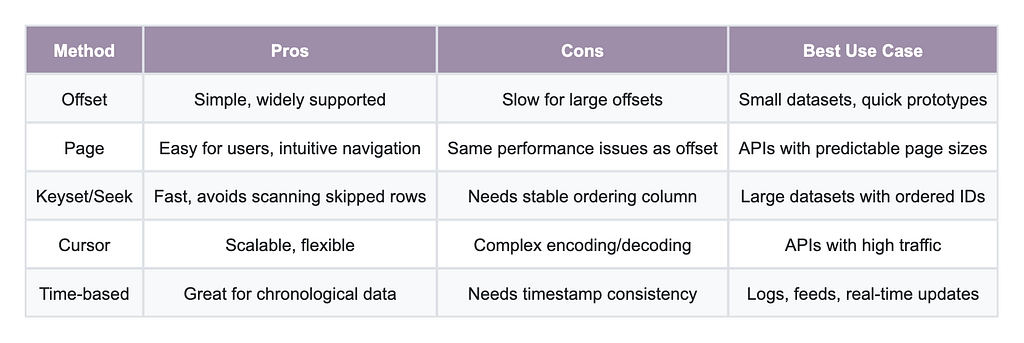
- For small datasets or simple APIs: Offset or Page is fine.
- For large datasets or performance-sensitive APIs: Keyset/Seek, or Cursor is better.
- For chronological data: Time-based is your friend.
Links:
- Mathieu Desnouveaux at the Forum PHP and his video
- APIPlatform: Pagination documentation
- NordicApis: 5 types of pagination
- Merge.dev: A guide to REST API pagination
- UUIDv4 vs UUIDv7
- Time base pagination
The pagination: behind the scenes was originally published in ekino-france on Medium, where people are continuing the conversation by highlighting and responding to this story.
Articles



Un projet ?
Parlez-nous de vous, de vos projets, de vos ambitions, de vos enjeux, et construisons ensemble des solutions concrètes qui contribuent à votre transformation.